Spacing
Spacing system
Using a consistent spacing system across our products helps bring visual balance in our interfaces, and leads to a better overall UI quality. The Thales Design System spacing system relies on very simple yet solid principles: rhythm and flexibility.
Spacing scale
As it is the case for the Typography Scale, the spacing method relies on a 4px baseline. The spacing scale is the key to composing everything, starting at the layout, to the most complex components. Every scale has a name (token), a rem value to ensure interface scalability with the system, and pixels relative equivalences.
| Asset | Token name | Pixels value | Rem value |
|---|---|---|---|
| $spacing.3xs | 2px | 0.125rem | |
| $spacing.xxs | 4px | 0.25rem | |
| $spacing.xs | 8px | 0.5rem | |
| $spacing.s | 12px | 0.75rem | |
| $spacing.m | 16px | 1rem | |
| $spacing.l | 24px | 1.5rem | |
| $spacing.xl | 32px | 2rem | |
| $spacing.xxl | 40px | 2.5rem | |
| $spacing.3xl | 48px | 3rem | |
| $spacing.4xl | 56px | 3.5rem | |
| $spacing.5xl | 64px | 4rem | |
| $spacing.6xl | 72px | 4.5rem | |
| $spacing.7xl | 80px | 5rem | |
| $spacing.8xl | 88px | 5.5rem | |
| $spacing.8xl | 96px | 6rem |
Application
Choosing the right spacing at the right place is crucial.
To help you choose wisely while designing interfaces, we have gathered some good practices.
Use space to create relationships
In interfaces and design in general, it is stated that elements that are close to each other are seen as related on the functional part. Therefore, the more space you have between elements, the more you tend to seperate them.
Use small spacings to group related elements (an text input and its label should be very close).
Read more about Gestalt’s Principles, and specifically the Law of Proximity.
Use space to create structure
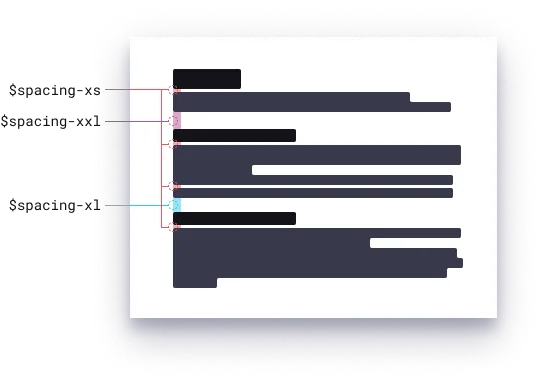
When mixing small and large values inside components but also with more structural assets like sections or widgets, you can create visual groups of related things.
By keeping a consistent spacing strategy within your interfaces, the end user will easily find what they are looking for. It’s all about choosing the good combinations, and this system gives space for creativity, and gives you the capacity to adjust spacing for any kind of device, screen size, or context of use.